X270: Unterschied zwischen den Versionen
Kug (Diskussion | Beiträge) |
|||
| (48 dazwischenliegende Versionen von 7 Benutzern werden nicht angezeigt) | |||
| Zeile 1: | Zeile 1: | ||
[[Datei:ThinkPad X270 CT2 07.jpg|thumb|ThinkPad X270]] | |||
Das X270 ist das achte Modell der 12"-Xxxx-Serie und der Nachfolger des [[X260]]. | Das X270 ist das achte Modell der 12"-Xxxx-Serie und der Nachfolger des [[X260]]. | ||
| Zeile 4: | Zeile 5: | ||
* Neue Prozessoren (Intel Kaby Lake-Generation) mit Intel HD Graphics 620 | * Neue Prozessoren (Intel Kaby Lake-Generation) mit Intel HD Graphics 620 | ||
* USB-Typ-C-Anschluss, dafür nur noch 2x USB Typ-A | * USB-Typ-C-Anschluss, dafür nur noch 2x USB Typ-A | ||
* neue Generation Fingerprint-Sensor | * neue Generation Fingerprint-Sensor (nicht alle Modelle) | ||
* M.2-SSD | * M.2-SSD | ||
| Zeile 11: | Zeile 12: | ||
<br> | <br> | ||
===CPU=== | |||
Es kommen von Intel sowohl Skylake als auch Kaby Lake | Es kommen von Intel sowohl Skylake als auch Kaby Lake Core i Prozessoren zum Einsatz. | ||
Core i der 6. Generation "Skylake": | |||
{| class="wikitable" | |||
! Processor Number !! # of Cores !! # of Threads !! Base Frequency !! Max Turbo Frequency !! Cache !! Memory Types !! Processor Graphics | |||
|- | |||
| i3-6006U || 2 || 4 || 2.0 GHz || - || 3MB || DDR4-2133 || Intel HD Graphics 520 | |||
|- | |||
| i3-6100U || 2 || 4 || 2.3 GHz || - || 3MB || DDR4-2133 || Intel HD Graphics 520 | |||
|- | |||
| i5-6200U || 2 || 4 || 2.3 GHz || 2.8 GHz || 3MB || DDR4-2133 || Intel HD Graphics 520 | |||
|- | |||
| i5-6300U || 2 || 4 || 2.4 GHz || 3.0 GHz || 3MB || DDR4-2133 || Intel HD Graphics 520 | |||
|- | |||
| i7-6500U || 2 || 4 || 2.5 GHz || 3.1 GHz || 4MB || DDR4-2133 || Intel HD Graphics 520 | |||
|- | |||
| i7-6600U || 2 || 4 || 2.6 GHz || 3.4 GHz || 4MB || DDR4-2133 || Intel HD Graphics 520 | |||
|} | |||
Core i der 7. Generation "Kaby Lake": | |||
{| class="wikitable" | |||
! Processor Number !! # of Cores !! # of Threads !! Base Frequency !! Max Turbo Frequency !! Cache !! Memory Types !! Processor Graphics | |||
|- | |||
| i3-7100U || 2 || 4 || 2.4 GHz || - || 3MB || DDR4-2133 || Intel HD Graphics 620 | |||
|- | |||
| i5-7200U || 2 || 4 || 2.5 GHz || 3.1 GHz || 3MB || DDR4-2133 || Intel HD Graphics 620 | |||
|- | |||
| i5-7300U || 2 || 4 || 2.6 GHz || 3.5 GHz || 3MB || DDR4-2133 || Intel HD Graphics 620 | |||
|- | |||
| i7-7500U || 2 || 4 || 2.7 GHz || 3.5 GHz || 4MB || DDR4-2133 || Intel HD Graphics 620 | |||
|- | |||
| i7-7600U || 2 || 4 || 2.8 GHz || 3.9 GHz || 4MB || DDR4-2133 || Intel HD Graphics 620 | |||
|} | |||
* Aufrüstbarkeit: keine, da CPU aufgelötet | |||
[[TDP]] alle 15W | [[TDP]] alle 15W | ||
===Grafikchip=== | |||
Intel HD Graphics 620 | * Intel HD Graphics 520 bei 6000 Prozessoren. | ||
* Intel HD Graphics 620 bei 7000 Prozessoren. | |||
Unterstützt externe digitale Monitore über HDMI oder USB Typ-C, bis zu drei unabhängige Displays. | |||
* Maximale Auflösung: | |||
** 4096 x 2160 bei 60 Hz (USB Typ-C) | |||
** 4096 x 2160 bei 24 Hz (HDMI). | |||
===Display=== | |||
* 12.5" 1366x768 ("HD"), LED | * 12.5" 1366x768 ("HD"), TN, anti-glare, LED backlight, 220 nits, 16:9 aspect ratio, 500:1 contrast ratio | ||
* 12.5" 1366x768 ("HD"), LED | * 12.5" 1366x768 ("HD"), IPS, anti-glare, LED backlight, 300 nits, 16:9 aspect ratio, 800:1 contrast ratio, 170° viewing angle | ||
* 12.5" 1920x1080 ("Full HD"), LED- | * 12.5" 1920x1080 ("Full HD"), IPS, anti-glare, LED backlight, 300 nits, 16:9 aspect ratio, 700:1 contrast ratio, 170° viewing angle | ||
On-Cell Touch, unterstützt 10-Finger Gesten (nur FHD) | |||
===Arbeitsspeicher=== | |||
* PC4- | * PC4-17066 2133MHz DDR4, ein Slot | ||
Aufrüstbarkeit: Laut Lenovo sind maximal 16GB möglich. | Aufrüstbarkeit: Laut Lenovo sind maximal 16GB möglich. Laut einigen Forumsmitgliedern sowie Reddit-Beiträgen sind 32GB möglich, Intel gibt für die oben genannten Prozessoren ebenfalls die Kompatibilität mit 32GB an. | ||
Die Geschwindigkeit der Module spielt ebenfalls keine Rolle, das heißt: Auch Module mit 3200, 2666 oder 2400 MHz laufen automatisch mit einem niedrigeren Takt. | |||
Getestete 32GB-Module: | |||
* Crucial CT32G4SFD832A | |||
* Samsung M471A4G43MB1-CTD | |||
* Kingston KVR32S22D8/32 | |||
<br> | <br> | ||
===Laufwerke=== | |||
Eines der folgenden Laufwerke ist ab Werk verbaut: | |||
* | Je nach Ausstattung existiert ein 2,5" slot oder ein M.2 2280 slot exklusiv für Speichermedien | ||
* 1x USB 3.1 Typ-C | * HDD / SATA 6.0Gb/s, 2.5" wide, 7mm high, Active Protection System 500GB/1TB | ||
* 1x HDMI, | * SSD / SATA 6.0Gb/s, 2.5" wide, 7mm high (e.g. xxxGB SSD) 128/180/256GB | ||
* M.2 SSD / PCIe NVMe, PCIe 3.0 x 2, 16Gb/s 128/256/512GB/1TB | |||
* 128GB M.2 SSD / SATA 6.0Gb/s, in WWAN slot as 2nd Storage, außer bei WGIG-Modellen | |||
** SSDs im WWAN-Slot müssen (mindestens) einen B-Key haben | |||
** M.2 PCIe NVMe mit B+M-Key im Format 2242 wurde [https://thinkpad-forum.de/threads/geht-doch-x270-nvme-ssd-im-wwan-port.234713/post-2329534 erfolgreich und bootfähig] im WWAN-Steckplatz verbaut | |||
* 4-in-1 reader (MMC, SD, SDHC, SDXC) | |||
===Schnittstellen=== | |||
* 2x USB 3.0 Typ-A (1x always-on), | |||
* 1x USB 3.1 Typ-C (mit der Funktion Power Delivery und DisplayPort) | |||
* 1x HDMI 1.4b, | |||
* 1x RJ-45, Gigabit-LAN | * 1x RJ-45, Gigabit-LAN | ||
* 1x 3,5mm Klinkenbuchse Kopfhörer | * 1x 3,5mm Klinkenbuchse Kopfhörer | ||
* 1x Kensington Lock, | * 1x Kensington Lock, | ||
* 1x Dockingport | * 1x Dockingport | ||
===Erweiterungsplätze=== | |||
Eine der folgenden WLAN-Karten ist verbaut (WGIG ohne WAN-Option) | |||
* Realtek RTL8822BE, Wi-Fi 2x2 802.11ac + BT4.1 | |||
* Intel Dual Band Wireless-AC 8260, Wi-Fi 2x2 802.11ac + BT4.1 | |||
* Intel Dual Band Wireless-AC 8265, Wi-Fi 2x2 802.11ac + BT4.1 | |||
* Intel Tri-Band Wireless-AC 18265, WiGig 802.11ad + Wi-Fi 2x2 802.11ac + BT4.1 (US only) | |||
Bluetooth 4.1 wireless, integrated in Wi-Fi + Bluetooth combo adapter | |||
* Intel 8265ac / 18265ac card support BT4.2, durch Windows auf BT4.1 limitiert | |||
WWAN: | |||
Eine der folgenden WAN-Adapter ist im M.2 Steckplatz verbaut (nicht bei WGIG) : | |||
* Wireless WAN upgradable | |||
* Integrated Mobile Broadband 4G LTE-A, Qualcomm Snapdragon™ X7 LTE-A (Sierra Wireless EM7455) | |||
* Integrated Mobile Broadband 4G LTE, | |||
* Intel XMM 7160 (Fibocom L831-EAU) (EMEA only) | |||
===Abmaße und Gewicht=== | |||
* 305,5 mm x 208,5 mm x 20,3 mm | * 305,5 mm x 208,5 mm x 20,3 mm | ||
* 1.37 kg, | * 1.37 kg, | ||
== Akku == | Die Angabe 20,3 mm Höhe vom Tisch lässt sich praktisch bei einem geschlossenen Gerät nur an der Vorderseite messen, an der hinteren Seite misst man bei nutzung des dünnen 23,5 Wh Akkus 24mm. Bei nutzung des 72 Wh Akkus misst man an der hinteren Seite 36mm. | ||
Folgende [[Akku]]s sind für das | |||
===Akku === | |||
Folgende [[Akku]]s sind für das X270 erhältlich: | |||
* Integrierter 3-Zellen-Akku, 23Wh, Lithium-Ionen oder Lithium-Polymer (optional) | * Integrierter 3-Zellen-Akku, 23Wh, Lithium-Ionen oder Lithium-Polymer (optional) | ||
* Wechselbarer 3-Zellen-Akku, 23Wh, Lithium-Ionen | * Wechselbarer 3-Zellen-Akku, 23Wh, Lithium-Ionen, 68 | ||
* Wechselbarer 6-Zellen-Akku, 48Wh, Lithium-Ionen | * Wechselbarer 6-Zellen-Akku, 48Wh, Lithium-Ionen, 68+ (optisch wie der 72Wh Akku, überstehend, ca. 295 Gramm) | ||
* Wechselbarer 6-Zellen-Akku, 72Wh, Lithium-Ionen | * Wechselbarer 6-Zellen-Akku, 72Wh, Lithium-Ionen, 68+ (optisch wie der 48Wh Akku, überstehend, ca. 323 Gramm) | ||
== zugehörige Dockingstation == | ===zugehörige Dockingstation === | ||
* ThinkPad Basic Dock | * ThinkPad USB 3.0 Basic Dock 40AA | ||
* ThinkPad Pro Dock | * ThinkPad Basic USB 3.0 Dock 4X10 | ||
* ThinkPad Ultra Dock | * ThinkPad Ultra Dock - 170 W 40A2 | ||
* ThinkPad Ultra Dock - 135 W 40A2 | |||
* ThinkPad Basic Dock - 65W 40A0 | |||
* ThinkPad Ultra Dock - 90W 40A2 | |||
* ThinkPad Pro Dock - 90 W 40A1 | |||
* ThinkPad Pro Dock - 65W 40A1 | |||
* ThinkPad Basic Dock 40A0 | |||
* ThinkPad USB 3.0 Pro Dock 40A7 | |||
* ThinkPad USB 3.0 Ultra Dock 40A8 | |||
* ThinkPad USB-C Dock 40A9 | |||
* ThinkPad Hybrid USB-C with USB-A Dock 40AF | |||
* ThinkPad Thunderbolt 3 Dock Gen 2 40AN | |||
* ThinkPad Thunderbolt 3 Workstation Dock Gen 2 40AN | |||
* ThinkPad USB-C Dock Gen2 40AS | |||
* Lenovo USB-C Travel Hub Gen2 4X91 | |||
* Lenovo USB-C Travel Hub Gen2 GX91 | |||
* [[ThinkPad WiGig Dock]] (nur bei Modellen mit werkseiting ausgestatteter WiGig-Karte) | |||
== Erfahrungs- und Testberichte == | == Erfahrungs- und Testberichte == | ||
* [https://www.notebookcheck.com/Test-Lenovo-ThinkPad-X270-Core-i5-Full-HD-Laptop.207858.0.html Testbericht von ''Notebookcheck''] | * [https://www.notebookcheck.com/Test-Lenovo-ThinkPad-X270-Core-i5-Full-HD-Laptop.207858.0.html Testbericht von ''Notebookcheck''] | ||
* [https://thinkpad-forum.de/threads/226064-Welche-FRU-und-Bezugsquelle-f%C3%BCr-M-2-Caddy-im-X270 M.2-SSD in einem 2,5-Zoll-Caddy] | |||
==Bekannte Probleme== | |||
==Tipps und Tricks== | |||
== Hardware-Modifikationen == | |||
===Umrüstung auf SSD M.2 Adapter Caddy NVME Festplatte mit Kabel=== | |||
Wegen schnellerer SSD M.2 NVME Festplatten kann man auf ein anderes Caddy "umbauen".<br> | |||
Bei manchen Modellen ist dies ab Werk schon verbaut. | |||
* FRU '''01HW969, 01AX994''' | |||
* PN '''DC02C009R10, SC10M85345''' | |||
* Teile Nr. DX270_M2_SSD-Cable SC10M85345 DC02C009R10<br> | |||
'''Bitte darauf Achten das Kabel muss ca. 12cm "lang" sein'''<br> | |||
<gallery> | |||
Datei:DX270 M2 SSD-Cable SC10M85345 DC02C009R10 Bild06.jpg|mini|alternativtext=DX270 M2 SSD-Cable SC10M85345 DC02C009R10 Bild06|DX270 M2 SSD-Cable SC10M85345 DC02C009R10 <br /> Kabel 01 | |||
Datei:DX270 M2 SSD-Cable SC10M85345 DC02C009R10 Bild01.1.jpg|mini|alternativtext=DX270 M2 SSD-Cable SC10M85345 DC02C009R10 Bild01.1|DX270 M2 SSD-Cable SC10M85345 DC02C009R10 <br /> Kabel 02 | |||
Datei:DX270 M2 SSD-Cable SC10M85345 DC02C009R10 Bild01.2.jpg|mini|alternativtext=DX270 M2 SSD-Cable SC10M85345 DC02C009R10 Bild01.2|DX270 M2 SSD-Cable SC10M85345 DC02C009R10 <br /> Kabel 03 | |||
Datei:DX270 M2 SSD-Cable SC10M85345 DC02C009R10 Bild01.jpg|mini|alternativtext=DX270 M2 SSD-Caddy SC10M85345 DC02C009R10 Bild01|DX270 M2 SSD-Caddy SC10M85345 DC02C009R10<br /> Ansicht 01 | |||
Datei:DX270 M2 SSD-Cable SC10M85345 DC02C009R10 Bild02.jpg|mini|alternativtext=DX270 M2 SSD-Caddy SC10M85345 DC02C009R10 Bild02|DX270 M2 SSD-Caddy SC10M85345 DC02C009R10<br /> Ansicht 02 | |||
Datei:DX270 M2 SSD-Cable SC10M85345 DC02C009R10 Bild03.jpg|mini|alternativtext=DX270 M2 SSD-Caddy SC10M85345 DC02C009R10 Bild03|DX270 M2 SSD-Caddy SC10M85345 DC02C009R10<br /> Ansicht 03 | |||
Datei:DX270 M2 SSD-Cable SC10M85345 DC02C009R10 Bild04.jpg|mini|alternativtext=DX270 M2 SSD-Caddy SC10M85345 DC02C009R10 Bild04|DX270 M2 SSD-Caddy SC10M85345 DC02C009R10<br /> Ansicht 04 | |||
Datei:DX270 M2 SSD-Cable SC10M85345 DC02C009R10 Bild05.jpg|mini|alternativtext=DX270 M2 SSD-Caddy SC10M85345 DC02C009R10 Bild05|DX270 M2 SSD-Caddy SC10M85345 DC02C009R10<br /> Ansicht 05 | |||
</gallery> | |||
== Treiber == | |||
* [https://pcsupport.lenovo.com/de/de/products/laptops-and-netbooks/thinkpad-x-series-laptops/thinkpad-x270/downloads/driver-list Treibermatrix Type 20H*] | |||
* [https://pcsupport.lenovo.com/de/de/products/laptops-and-netbooks/thinkpad-x-series-laptops/thinkpad-x270-type-20k6-20k5/downloads/driver-list Treibermatrix Type 20K*] | |||
== Weblinks == | |||
* [https://download.lenovo.com/pccbbs/mobiles_pdf/x270_hmm_en_sp40j65511_03.pdf Hardware Maintenance Manual] | |||
* [https://download.lenovo.com/pccbbs/mobiles_pdf/x270_ug_de.pdf Benutzerhandbuch (PDF)] | |||
* [https://psref.lenovo.com/WDProduct/ThinkPad/ThinkPad_X270?tab=model PSREF] | |||
* [https://psref.lenovo.com/syspool/Sys/PDF/ThinkPad/ThinkPad_X270/ThinkPad_X270_Spec.PDF?v=b181c767-4ce7-4be3-96d2-8d9154bb4dcb Spezifikation] | |||
[[Category:ThinkPad]][[Category:Hardware]][[Category:X-Serie]] | |||
Aktuelle Version vom 16. Oktober 2025, 11:13 Uhr

Das X270 ist das achte Modell der 12"-Xxxx-Serie und der Nachfolger des X260.
Wesentliche Unterschiede zum Vorgänger (X260):
- Neue Prozessoren (Intel Kaby Lake-Generation) mit Intel HD Graphics 620
- USB-Typ-C-Anschluss, dafür nur noch 2x USB Typ-A
- neue Generation Fingerprint-Sensor (nicht alle Modelle)
- M.2-SSD
Technische Daten
Aufgeführt werden die ursprünglich erhältlichen Varianten sowie eventuell die mögliche maximale Ausbaustufen.
CPU
Es kommen von Intel sowohl Skylake als auch Kaby Lake Core i Prozessoren zum Einsatz.
Core i der 6. Generation "Skylake":
| Processor Number | # of Cores | # of Threads | Base Frequency | Max Turbo Frequency | Cache | Memory Types | Processor Graphics |
|---|---|---|---|---|---|---|---|
| i3-6006U | 2 | 4 | 2.0 GHz | - | 3MB | DDR4-2133 | Intel HD Graphics 520 |
| i3-6100U | 2 | 4 | 2.3 GHz | - | 3MB | DDR4-2133 | Intel HD Graphics 520 |
| i5-6200U | 2 | 4 | 2.3 GHz | 2.8 GHz | 3MB | DDR4-2133 | Intel HD Graphics 520 |
| i5-6300U | 2 | 4 | 2.4 GHz | 3.0 GHz | 3MB | DDR4-2133 | Intel HD Graphics 520 |
| i7-6500U | 2 | 4 | 2.5 GHz | 3.1 GHz | 4MB | DDR4-2133 | Intel HD Graphics 520 |
| i7-6600U | 2 | 4 | 2.6 GHz | 3.4 GHz | 4MB | DDR4-2133 | Intel HD Graphics 520 |
Core i der 7. Generation "Kaby Lake":
| Processor Number | # of Cores | # of Threads | Base Frequency | Max Turbo Frequency | Cache | Memory Types | Processor Graphics |
|---|---|---|---|---|---|---|---|
| i3-7100U | 2 | 4 | 2.4 GHz | - | 3MB | DDR4-2133 | Intel HD Graphics 620 |
| i5-7200U | 2 | 4 | 2.5 GHz | 3.1 GHz | 3MB | DDR4-2133 | Intel HD Graphics 620 |
| i5-7300U | 2 | 4 | 2.6 GHz | 3.5 GHz | 3MB | DDR4-2133 | Intel HD Graphics 620 |
| i7-7500U | 2 | 4 | 2.7 GHz | 3.5 GHz | 4MB | DDR4-2133 | Intel HD Graphics 620 |
| i7-7600U | 2 | 4 | 2.8 GHz | 3.9 GHz | 4MB | DDR4-2133 | Intel HD Graphics 620 |
- Aufrüstbarkeit: keine, da CPU aufgelötet
TDP alle 15W
Grafikchip
- Intel HD Graphics 520 bei 6000 Prozessoren.
- Intel HD Graphics 620 bei 7000 Prozessoren.
Unterstützt externe digitale Monitore über HDMI oder USB Typ-C, bis zu drei unabhängige Displays.
- Maximale Auflösung:
- 4096 x 2160 bei 60 Hz (USB Typ-C)
- 4096 x 2160 bei 24 Hz (HDMI).
Display
- 12.5" 1366x768 ("HD"), TN, anti-glare, LED backlight, 220 nits, 16:9 aspect ratio, 500:1 contrast ratio
- 12.5" 1366x768 ("HD"), IPS, anti-glare, LED backlight, 300 nits, 16:9 aspect ratio, 800:1 contrast ratio, 170° viewing angle
- 12.5" 1920x1080 ("Full HD"), IPS, anti-glare, LED backlight, 300 nits, 16:9 aspect ratio, 700:1 contrast ratio, 170° viewing angle
On-Cell Touch, unterstützt 10-Finger Gesten (nur FHD)
Arbeitsspeicher
- PC4-17066 2133MHz DDR4, ein Slot
Aufrüstbarkeit: Laut Lenovo sind maximal 16GB möglich. Laut einigen Forumsmitgliedern sowie Reddit-Beiträgen sind 32GB möglich, Intel gibt für die oben genannten Prozessoren ebenfalls die Kompatibilität mit 32GB an.
Die Geschwindigkeit der Module spielt ebenfalls keine Rolle, das heißt: Auch Module mit 3200, 2666 oder 2400 MHz laufen automatisch mit einem niedrigeren Takt.
Getestete 32GB-Module:
- Crucial CT32G4SFD832A
- Samsung M471A4G43MB1-CTD
- Kingston KVR32S22D8/32
Laufwerke
Eines der folgenden Laufwerke ist ab Werk verbaut: Je nach Ausstattung existiert ein 2,5" slot oder ein M.2 2280 slot exklusiv für Speichermedien
- HDD / SATA 6.0Gb/s, 2.5" wide, 7mm high, Active Protection System 500GB/1TB
- SSD / SATA 6.0Gb/s, 2.5" wide, 7mm high (e.g. xxxGB SSD) 128/180/256GB
- M.2 SSD / PCIe NVMe, PCIe 3.0 x 2, 16Gb/s 128/256/512GB/1TB
- 128GB M.2 SSD / SATA 6.0Gb/s, in WWAN slot as 2nd Storage, außer bei WGIG-Modellen
- SSDs im WWAN-Slot müssen (mindestens) einen B-Key haben
- M.2 PCIe NVMe mit B+M-Key im Format 2242 wurde erfolgreich und bootfähig im WWAN-Steckplatz verbaut
- 4-in-1 reader (MMC, SD, SDHC, SDXC)
Schnittstellen
- 2x USB 3.0 Typ-A (1x always-on),
- 1x USB 3.1 Typ-C (mit der Funktion Power Delivery und DisplayPort)
- 1x HDMI 1.4b,
- 1x RJ-45, Gigabit-LAN
- 1x 3,5mm Klinkenbuchse Kopfhörer
- 1x Kensington Lock,
- 1x Dockingport
Erweiterungsplätze
Eine der folgenden WLAN-Karten ist verbaut (WGIG ohne WAN-Option)
- Realtek RTL8822BE, Wi-Fi 2x2 802.11ac + BT4.1
- Intel Dual Band Wireless-AC 8260, Wi-Fi 2x2 802.11ac + BT4.1
- Intel Dual Band Wireless-AC 8265, Wi-Fi 2x2 802.11ac + BT4.1
- Intel Tri-Band Wireless-AC 18265, WiGig 802.11ad + Wi-Fi 2x2 802.11ac + BT4.1 (US only)
Bluetooth 4.1 wireless, integrated in Wi-Fi + Bluetooth combo adapter
- Intel 8265ac / 18265ac card support BT4.2, durch Windows auf BT4.1 limitiert
WWAN:
Eine der folgenden WAN-Adapter ist im M.2 Steckplatz verbaut (nicht bei WGIG) :
- Wireless WAN upgradable
- Integrated Mobile Broadband 4G LTE-A, Qualcomm Snapdragon™ X7 LTE-A (Sierra Wireless EM7455)
- Integrated Mobile Broadband 4G LTE,
- Intel XMM 7160 (Fibocom L831-EAU) (EMEA only)
Abmaße und Gewicht
- 305,5 mm x 208,5 mm x 20,3 mm
- 1.37 kg,
Die Angabe 20,3 mm Höhe vom Tisch lässt sich praktisch bei einem geschlossenen Gerät nur an der Vorderseite messen, an der hinteren Seite misst man bei nutzung des dünnen 23,5 Wh Akkus 24mm. Bei nutzung des 72 Wh Akkus misst man an der hinteren Seite 36mm.
Akku
Folgende Akkus sind für das X270 erhältlich:
- Integrierter 3-Zellen-Akku, 23Wh, Lithium-Ionen oder Lithium-Polymer (optional)
- Wechselbarer 3-Zellen-Akku, 23Wh, Lithium-Ionen, 68
- Wechselbarer 6-Zellen-Akku, 48Wh, Lithium-Ionen, 68+ (optisch wie der 72Wh Akku, überstehend, ca. 295 Gramm)
- Wechselbarer 6-Zellen-Akku, 72Wh, Lithium-Ionen, 68+ (optisch wie der 48Wh Akku, überstehend, ca. 323 Gramm)
zugehörige Dockingstation
- ThinkPad USB 3.0 Basic Dock 40AA
- ThinkPad Basic USB 3.0 Dock 4X10
- ThinkPad Ultra Dock - 170 W 40A2
- ThinkPad Ultra Dock - 135 W 40A2
- ThinkPad Basic Dock - 65W 40A0
- ThinkPad Ultra Dock - 90W 40A2
- ThinkPad Pro Dock - 90 W 40A1
- ThinkPad Pro Dock - 65W 40A1
- ThinkPad Basic Dock 40A0
- ThinkPad USB 3.0 Pro Dock 40A7
- ThinkPad USB 3.0 Ultra Dock 40A8
- ThinkPad USB-C Dock 40A9
- ThinkPad Hybrid USB-C with USB-A Dock 40AF
- ThinkPad Thunderbolt 3 Dock Gen 2 40AN
- ThinkPad Thunderbolt 3 Workstation Dock Gen 2 40AN
- ThinkPad USB-C Dock Gen2 40AS
- Lenovo USB-C Travel Hub Gen2 4X91
- Lenovo USB-C Travel Hub Gen2 GX91
- ThinkPad WiGig Dock (nur bei Modellen mit werkseiting ausgestatteter WiGig-Karte)
Erfahrungs- und Testberichte
Bekannte Probleme
Tipps und Tricks
Hardware-Modifikationen
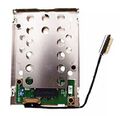
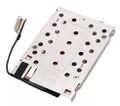
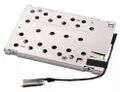
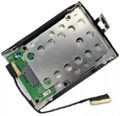
Umrüstung auf SSD M.2 Adapter Caddy NVME Festplatte mit Kabel
Wegen schnellerer SSD M.2 NVME Festplatten kann man auf ein anderes Caddy "umbauen".
Bei manchen Modellen ist dies ab Werk schon verbaut.
- FRU 01HW969, 01AX994
- PN DC02C009R10, SC10M85345
- Teile Nr. DX270_M2_SSD-Cable SC10M85345 DC02C009R10
Bitte darauf Achten das Kabel muss ca. 12cm "lang" sein
-
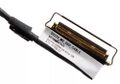 DX270 M2 SSD-Cable SC10M85345 DC02C009R10
Kabel 01 -
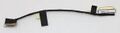 DX270 M2 SSD-Cable SC10M85345 DC02C009R10
Kabel 02 -
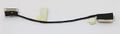 DX270 M2 SSD-Cable SC10M85345 DC02C009R10
Kabel 03 -
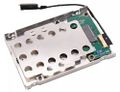 DX270 M2 SSD-Caddy SC10M85345 DC02C009R10
Ansicht 01 -
 DX270 M2 SSD-Caddy SC10M85345 DC02C009R10
Ansicht 02 -
 DX270 M2 SSD-Caddy SC10M85345 DC02C009R10
Ansicht 03 -
 DX270 M2 SSD-Caddy SC10M85345 DC02C009R10
Ansicht 04 -
 DX270 M2 SSD-Caddy SC10M85345 DC02C009R10
Ansicht 05


